Touchscreen terminal
A clear, intuitive workspace for ringing sales and managing daily register tasks.
Retail POS systems
Connect barcode checkout, inventory, payments and reporting with an NRS retail POS system for convenience stores, grocery stores, smoke shops and beauty supply stores.
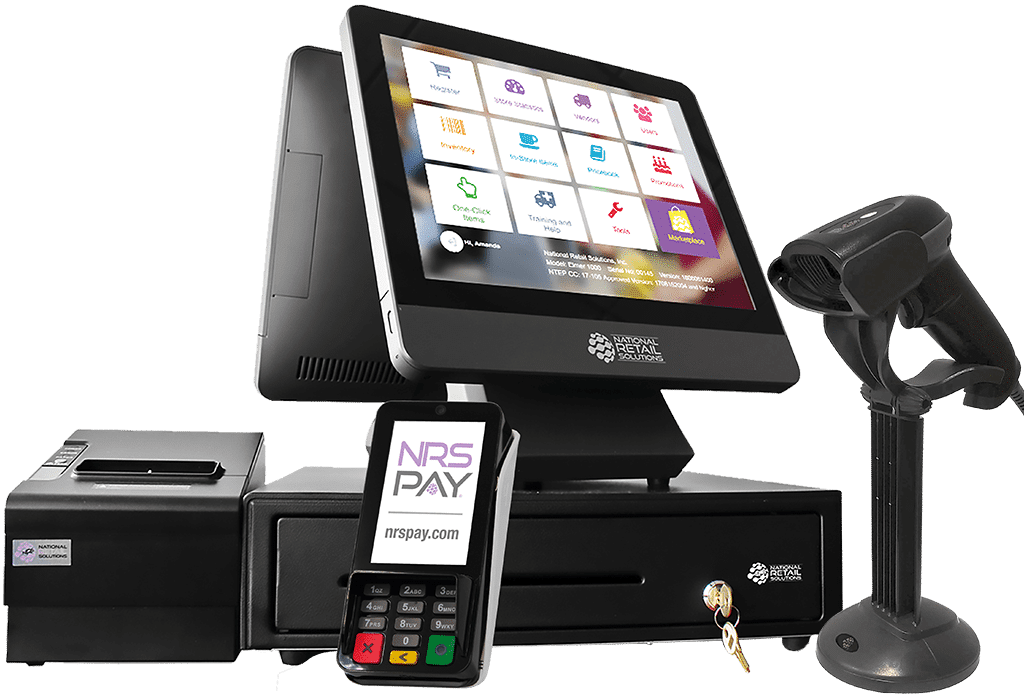
All-in-one hardware
Bring the essential parts of a modern retail register together in one coordinated setup. The pictured NRS bundle combines customer and merchant displays with the tools your staff uses every day.
POS bundle
Choose the components that make sense for your space, transaction volume and checkout workflow.
A clear, intuitive workspace for ringing sales and managing daily register tasks.
Scan merchandise quickly and reduce manual item entry at checkout.
Provide fast customer receipts with a compact thermal printer.
Accept compatible card and contactless payment types at the counter.
Retail software
Your POS should do more than ring up a sale. NRS retail tools can help organize items, monitor activity and give owners a clearer view of store performance.
Everyday control
Practical tools help owners reduce friction at checkout and create more consistent store operations.
Keep product information and pricing organized in one system.
Review sales patterns and useful store-level performance information.
Assign individual access and help protect sensitive register functions.
Get dedicated help choosing and configuring a system for your business.
Compare your options
Compare equipment for your checkout counter, then select monthly software and optional accessories separately.
For convenience stores, smoke shops, grocery stores and beauty supply stores.
For liquor stores only.
For gas stations requiring pay-at-the-pump integration.
Pump integration, controllers and installation depend on your site configuration.
Hardware prices exclude tax. Monthly software, processing terms, eligibility and any installation requirements are reviewed separately in your final quote. ID-scanning software features depend on the selected plan.
Add a Speed Gun for $499, a Sales Tag Printer for $129, or an Internet Failover Router for $349 plus a $15 monthly cellular fee. The router is an optional accessory, with cellular coverage required.
Choose accessories and build your package| Plan | Included tools | When to consider it |
|---|---|---|
| Basic | Inventory and pricebook management, sales statistics, user permissions, promotions and remote management. | Stores that need core checkout and day-to-day inventory tools. |
| Pro | Basic features plus advanced data, employee time clock, customer tabs, remote manager override and SMS receipts. | Owners who need more detailed reporting and staff-management tools. |
| Advanced | Pro features plus license ID scanning, anti-theft alerts, vendor orders, ecommerce and loyalty programs. | Stores that need expanded inventory workflows, online selling and customer loyalty. |
Some features require compatible equipment or third-party eligibility. Review software charges, processing terms, optional programs and installation needs in your final quote.
Choose by store type
Compare the checkout and inventory needs of your store before choosing hardware and software.
Start with your register count, product catalog, inventory workflow and payment requirements. A specialist reviews your equipment and software selections, eligibility and pricing, then helps plan the configuration for your store. Confirm product-data preparation, equipment setup, staff training and ongoing support arrangements before approving your order.
Discuss retail POS setup with a specialistCommon questions
Helpful answers for store owners comparing NRS hardware, software and payment options.
Our Retail POS hardware package is $699, with your monthly software selected separately. NRS Pay monthly fees, optional programs and qualifying requirements may be additional. See the pricing page and request a complete quote for your store.
Basic covers core inventory and reporting tools. Pro adds advanced data and staff-management features. Advanced adds tools such as vendor orders, ecommerce and loyalty programs. Confirm equipment requirements and feature availability before selecting a plan.
Depending on the selected bundle, hardware can include a touchscreen register, customer-facing display, barcode or license ID scanner, thermal receipt printer, cash drawer and compatible payment reader. Confirm the final equipment list in your quote.
Yes our software includes pricebook and inventory management, sales reporting and remote management tools. Features vary by software plan and configuration.
A compatible NRS Pay setup can connect the POS and payment equipment for a more coordinated checkout workflow. Processing and equipment are subject to approval and the selected configuration.
Start with your store type, register count, checkout volume, product catalog, employee access needs and optional programs. We can compare equipment and software around that workflow.
Ready for a better register?
Get straightforward guidance from an independent NRS reseller serving businesses nationwide.